
USER GUIDE
Accept a quote and turn it into an order
One press turns a sent quote into a new, linked sales order.
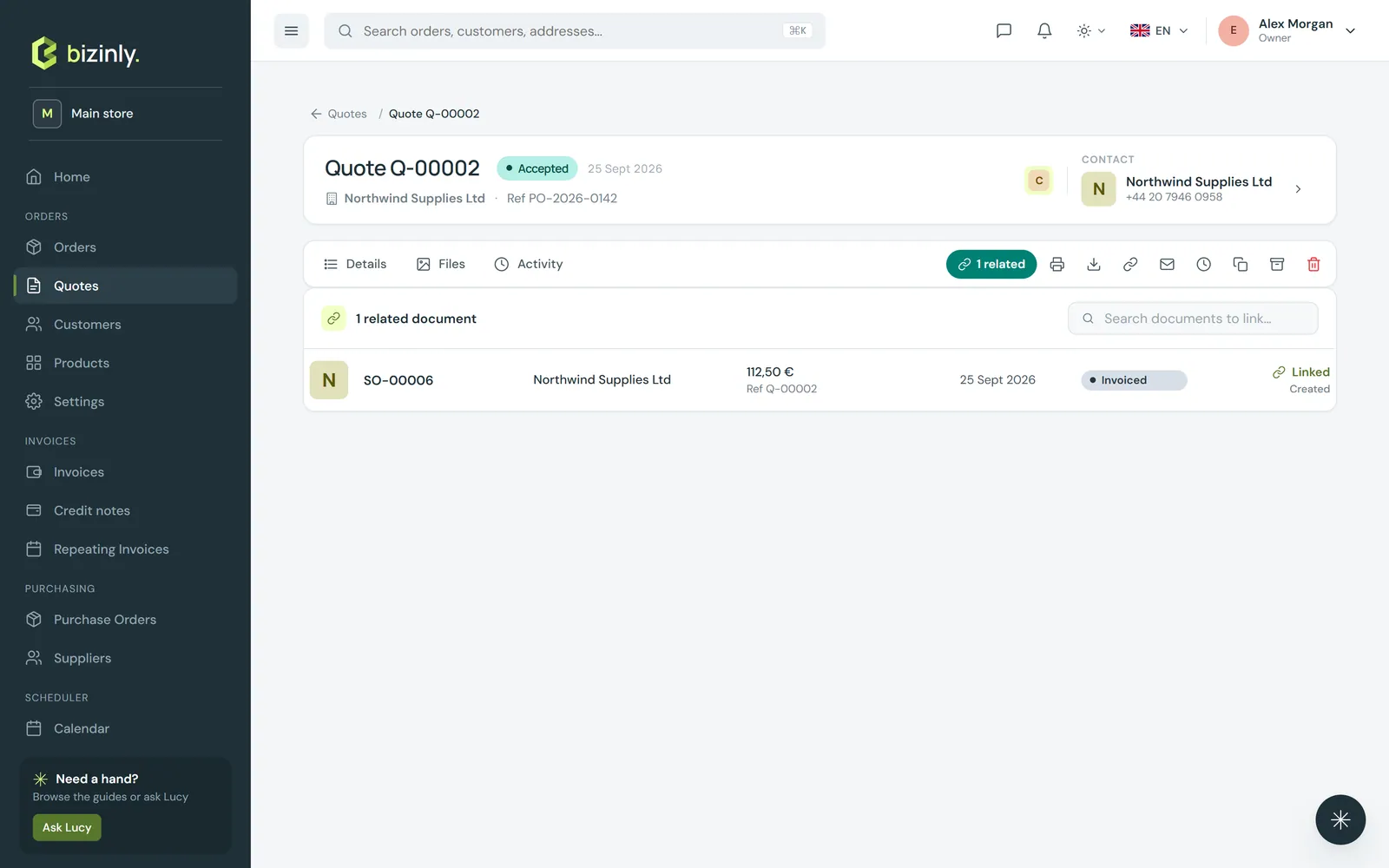
Press Accept on a Sent quote: Bizinly creates a new sales order — draft, numbered at once — with the same customer, header and lines, links it to the quote and marks the quote Accepted.
- Open the quote. If it is still Draft, press Mark sent first — Accept is only offered on a sent quote.
- Press Accept. A confirmation shows the new order number, and the quote's status becomes Accepted (closed — no more edits).
- Open the order from the quote's Related tab, or from Orders. Its reference field holds the quote number, and totals are recomputed from the copied lines. The order stays in Draft until you Confirm it.
 4. If the customer says no, press Decline; if the offer lapsed, press Expire. Both can be reopened later.
5. Not copied to the order: the quote's valid-until date and its internal notes — set the order's own expected date on its edit page if you need one.
4. If the customer says no, press Decline; if the offer lapsed, press Expire. Both can be reopened later.
5. Not copied to the order: the quote's valid-until date and its internal notes — set the order's own expected date on its edit page if you need one.
Related: Create a quote, Create a sales order, Working with documents.